
Minecraft 1.21.90.20
🎮 Minecraft PE Android Mod Installation Tutorial 🎮✅ Step 1: Download the Mod
- Download Minecraft 1.21.90.20.
- Download the mod file in .mcpack,.mcworld, .mcaddon, or .zip
🔧 Step 2: Open with ZArchiver
- Open ZArchiver and go to the “Download” folder.
- Select the .mcpack,.mcaddon, or..mcworld file
- Click Share andMinecraft.
🚀 Step 3: Import to Minecraft
- Minecraft will automatically open and impo
- Wait for the “Import Successful” message.
📂 Step 4: Enable the Mod in Minecraft
- Go to Play > Create New > Create New World.
- Scroll down to Resource Packs orBehavior Packs.
- Select the mod and tap the + button to a
- Enable Experimental Gameplay
- Tap Create to
🎮 How to Install Minecraft PE Mods/Addons for iOS (iPhone/iPad) 🎮
✅ Step 1: Download the Mod
- Visit jennymod.net websites Download Minecraft 1.21.90.20.
- Download the mod file in .mcpack,.mcworld, .mcaddon, or .zip
🔧 Step 2: Open the Files App
- Open the Files app (built-in on iOS).
- Go to the “Downloads” folder.
📤 Step 3: Share to Minecraft
- Select the .mcpack, .mcaddon, or .mcworld file.
- Tap Share > Minecraft.
- Minecraft will open and show “Import Started…” ✅
- Wait for “Successfully Imported!” 🎉
🎮 Step 4: Activate the Mod in Minecraft
- Open Minecraft PE.
- Tap Play > Create New > Create New World.
- Scroll down to Resource Packs orBehavior Packs.
- Select the mod and tap + to activate it.
- Enable “Experimental Gameplay” if needed. 6
- Tap Create to enter the
Images


Description
Minecraft PE 1.21.90.20 Free Download – Spring to Life Update for Android (Xbox Live Supported)
Discover how to grow Ghasting, ride the Happy Ghast using Harness and Leash, and explore exciting new features in the latest Minecraft 1.21.90.20 Beta!
What’s New in Minecraft Bedrock 1.21.90.20?
Before diving in, players should review past Minecraft Bedrock 1.21 updates to see the latest changes. This version introduces leashing mechanics, flying mobs, and more!
🚀 Ride the Happy Ghast – Your New Flying Transport!
Players can now tame and ride Happy Ghasts for sky adventures! Up to four players can mount a single Happy Ghast, with the first rider controlling its movement.
🔹 Fun Fact: The Happy Ghast always wears a *cheerful smile! 😊
🪢 Leashing Updates – Tying Mobs Just Got Better!
The Leash now has new functions in Minecraft 1.21.90.20:
-
Tie mobs using leash knots (sneak + interact).
-
Works on Happy Ghasts, but they break free at 16 blocks distance.
🔥 Dried Ghast Block – Grow Your Own Ghasting!
Venture into the Nether to find the Dried Ghast block, a key ingredient for growing Ghasting mobs. Once raised, these creatures can evolve into flying companions!
🛡️ Harness – Craft & Customize for Flight!
The new Harness item lets players ride Happy Ghasts in style!
-
16 dye colors (depends on wool used).
-
Crafted with glass, leather, and wool.
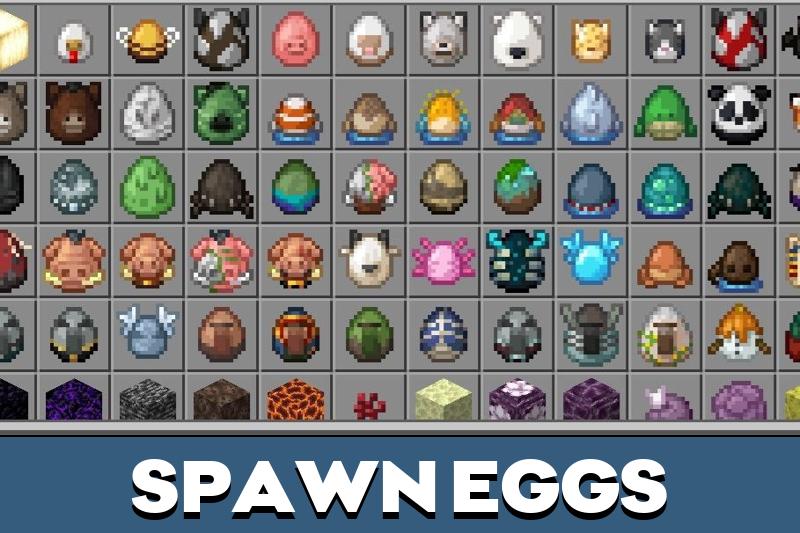
🥚 Spawn Eggs – Fresh New Look!
Spawn eggs in Creative Mode now have unique shapes and sizes, though their functions remain unchanged.
🐑 Exotic Sheep Colors in Biomes!
Find rare sheep variants in different biomes, including:
-
Pink, black, brown, and more!
Ready to explore? Download Minecraft PE 1.21.90.20 now and experience flying ghasts, leashing tricks, and vibrant new mobs! 🎮✨
That’s great
It was perfect